Case Study
Always Live, Real-Time

Google Sheets to
Live Dashboard

Turn your messy spreadsheet into a beautiful, real-time business dashboard no Power BI, no data team, no technical setup required.

📈 Business Dashboard
Live
₹4.2L
Revenue
↑ 18%
1,847
Orders
↑ 12%
94%
Fulfillment
↑ 3%
Weekly Revenue Trend
Last 7 days
MonTueWedThuFriSatToday
Sales target hit 104% of weekly goal
Inventory low 3 SKUs below threshold
2 orders delayed action needed
Live Dashboard
Live
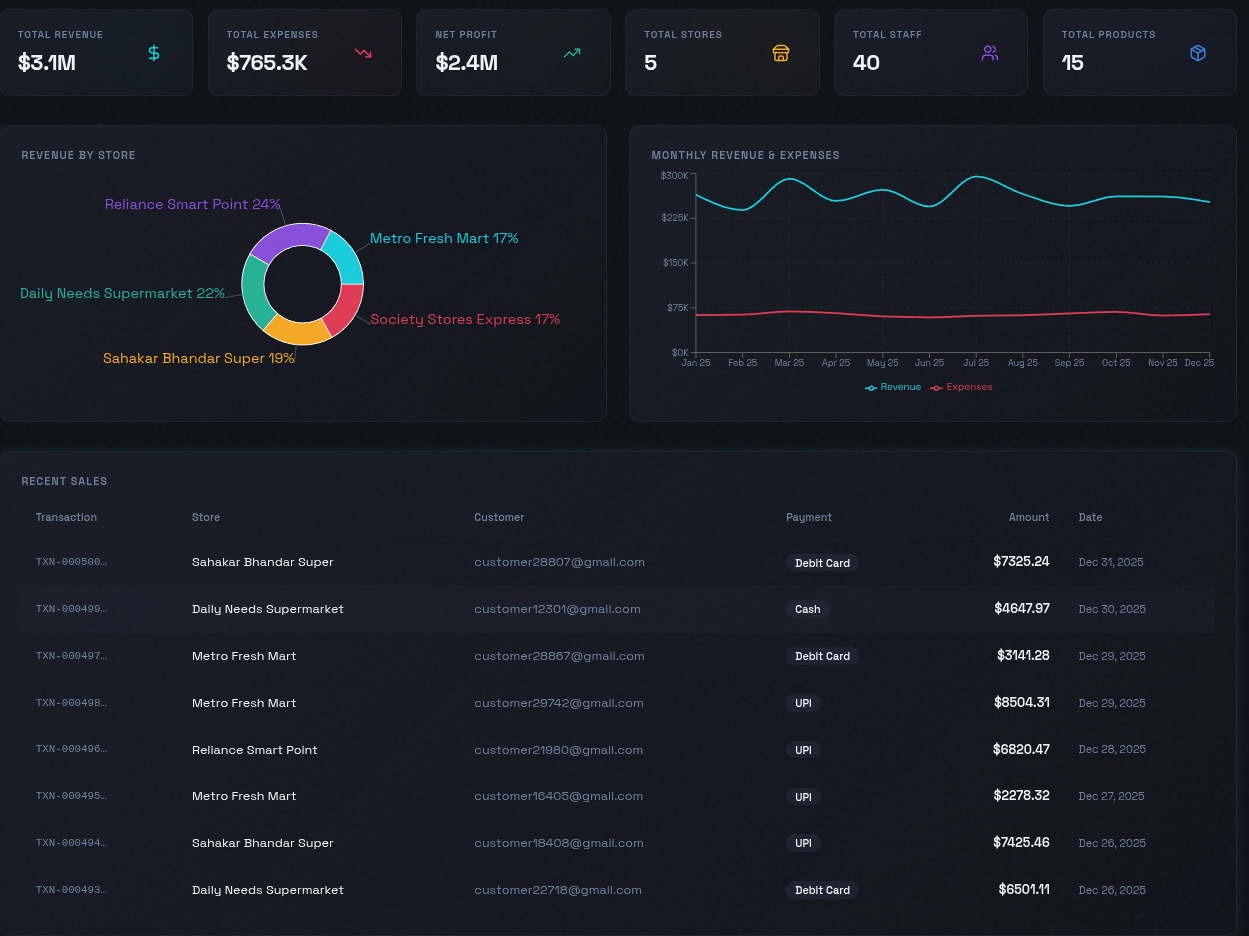
Live Google Sheets dashboard with KPIs and charts
Auto-Syncing
24h
Fast Setup
From share to live: From sharing your Google Sheet link to a live, usable dashboard. No back-and-forth, no technical calls.
🎯
100%
Built Around Your Data
Your layout: Tabs, charts, and KPIs mirror your actual dataset not a fixed template or demo data.
🚫
Zero
No Team Needed
No analyst, no dev: No IT department, no BI consultant, no Power BI licence required. Just your Sheet.
🔄
Live
Always Updated
Real-time sync: Dashboard updates the second your Sheet changes no manual refresh, no export.
The System

From Sheet to dashboard in a day

Three steps from sharing your spreadsheet to having a live, decision-ready dashboard. No rebuilding, no reformatting, no engineers.

01
🔗
Connect Your Sheet

Share your Google Sheet link. That's it no exports, no CSV uploads, no reformatting. The system reads your live data directly.

02
🧠
We Map Your Data

The system reads your columns sales, expenses, inventory, staff and auto-assigns the right charts, KPIs, and alert thresholds for your business.

03
🚀
Go Live in 24 Hours

Your dashboard goes live in under 24 hours, accessible on any device by your whole team. Every Sheet update reflects instantly no manual refresh.

Before & After

From rows of data to instant clarity

The same business data completely different experience. On the left, what most business owners put up with. On the right, what a live dashboard gives you instead.

Before – Spreadsheet chaos
  • Scrolling through rows of raw data to find one number
  • Exporting and reformatting every time you need a report
  • Numbers out of date by the time you look at them
  • No alerts when something goes wrong or targets are hit
  • Can't share a clean view with your team or investors
  • Every insight requires manual calculation and guesswork
After – Live Dashboard
  • One screen shows every KPI your business cares about
  • Charts update automatically the moment the Sheet changes
  • Anomaly alerts catch problems before you even notice them
  • Share a live, read-only view with your whole team
  • Trend comparisons built in week-over-week, month-over-month
  • Make decisions in seconds, not after 30 minutes of searching
Why Not Power BI?

Built for owners, not data teams

Feature Power BI Google Analytics Karlspace
How fast can you go live? Days–Weeks Hours (website only) Under 24 hours
Needs technical help? Yes – developer required Sometimes No – we handle it
Uses your live Google Sheet Requires export or connector Not possible Direct connection
Custom to your data structure Yes, but complex setup No Yes, built around your Sheet
Pricing for small teams Expensive per user per month Free but hard to use Affordable one-time setup
Non-technical team can use it? Difficult Very difficult Extremely easy
FAQ

Common Questions

Everything you need to know before we build your dashboard.

Still have questions? Book a call →
Does my Google Sheet need to be formatted a specific way?
No. We work with your Sheet as-is. Whether it's a simple sales log, a complex inventory tracker, or a multi-tab financial model we map it into your dashboard. You don't need to change anything.
Can my whole team see the dashboard?
Yes. You can share a live, read-only link with your team (or specific people). They can view and interact with the dashboard from any device phone, tablet, desktop without needing to access the raw Sheet.
What happens if I change my Sheet structure later?
Minor changes new rows, renamed columns are handled automatically. If you significantly restructure the Sheet (add new tabs, change core columns), we'll update the dashboard mapping for you, usually within 24 hours.
Is my business data safe?
The dashboard connects to your Sheet using read-only access via Google's secure API. We never store a copy of your data the dashboard reads directly from your Sheet. Your data stays in your Google account at all times.
What types of charts and KPIs can you build?
Line charts, bar charts, pie charts, tables, scorecards, trend comparisons, and anomaly alerts. We also set up key KPI tiles for things like revenue, expenses, units sold, fulfilment rate whatever your business tracks most.
Build Yours

Configure your Dashboard

The core system connects to your Google Sheet and builds a live, real-time business dashboard. Add modules to make it smarter.

Core — Included Always On
  • Live connection to your Google Sheet — no exports
  • KPI tiles, trend charts, week-over-week comparison
  • Anomaly alerts — stock, revenue, fulfilment thresholds
  • Shareable read-only link for team & investors
  • Deployed and accessible on any device in under 24h
Add-ons Optional
Automated Report Emails
Weekly or daily dashboard snapshot sent to your inbox — no need to log in to stay informed. Auto-generated, auto-sent.
Add-on
Auto Graph Generation
AI interprets your data and builds new chart types automatically when it detects patterns — Gantt, scatter, heatmap, cohort.
Add-on
Your Configuration
Sheets Dashboard (core)
Estimate
Contact for quote
Get a Quote →
One-time build · You own it · 30-min free call
Get Started Today

Want this for
your business?

Share your Google Sheet and we'll show you exactly what your dashboard will look like before you commit to anything.

View Demo Project

30-minute call · No sales pressure · Real answers